WordPress
Dynamic landing pages in WordPress: a different headline for every Google Ads ad group
By Alparslan Kapani · · 9 min read
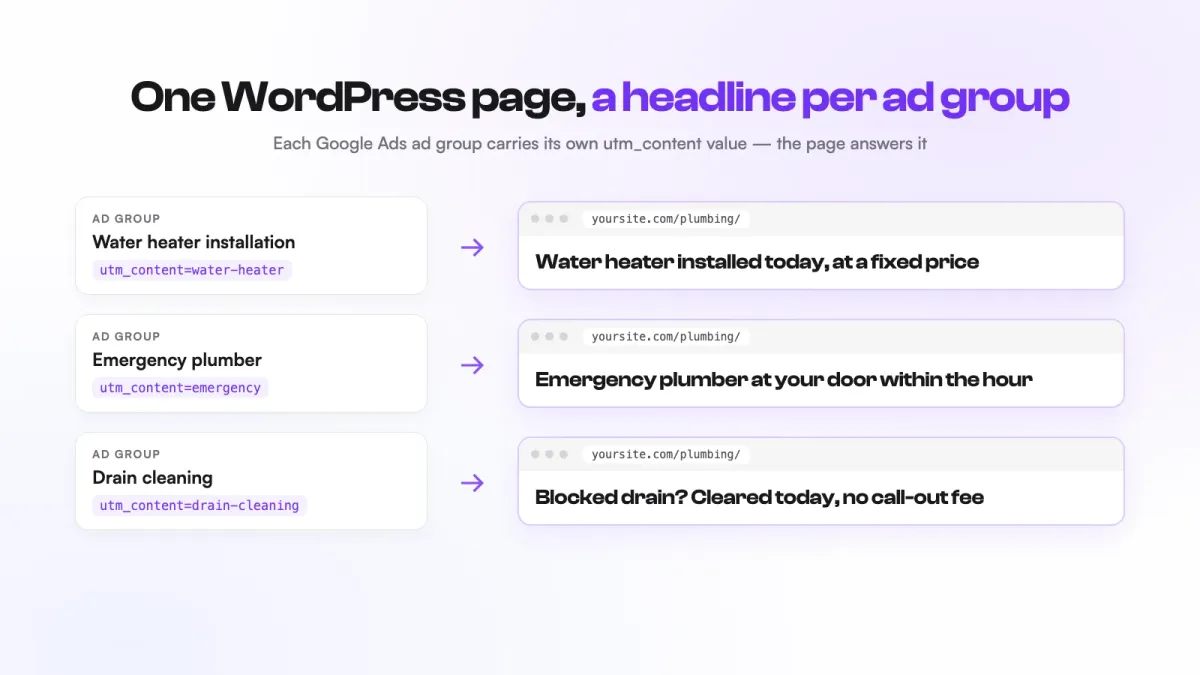
There are three ways to show a different headline for each Google Ads ad group in WordPress: duplicate the page once per ad group, add a free snippet that reads the ad group from the URL and swaps the headline, or use a personalization plugin that does it on the same page without code. Which one fits depends mostly on how many ad groups you run. Two or three? Duplicating is fine. Ten or more, and the other two start to pay for themselves.
Key takeaways
- Tag every ad group’s URL with its own
utm_contentvalue first. All three methods depend on it. - Duplicate pages are the simplest start, and the most work to keep in sync later.
- A free JavaScript snippet can swap the headline, but it has to be JavaScript: page caches serve the same HTML for UTM links by default, so PHP usually won’t see the value.
- Keep any personalization script out of your speed plugin’s “delay JavaScript” setting, or the headline changes late.
- The Convertus plugin has a free-forever plan on WordPress: 1,000 personalized page views and 50 AI-written variants a month.
Why give each ad group its own headline?
Because the visitor just told you what they want, and your page should answer it. Someone who clicked an ad about water heater installation and lands on a homepage that opens with “Your trusted local plumber” has to go looking for what they came for. Many won’t.
Google cares too. Landing page experience is one of the three parts of Quality Score, next to expected click-through rate and ad relevance. A page that says what the ad said helps the score, and a better score can mean paying less for the same position.
The usual advice is “build a landing page for every ad group”. Nice in theory. In practice, small teams build three pages and then stop.
Step zero: tag each ad group’s URL
Before any method works, each ad group needs a way to identify itself. The cleanest way is a final URL suffix on the ad group, which Google Ads lets you set at the ad group level (as well as on accounts, campaigns, ads and keywords).
In Google Ads, open the ad group’s settings, find the URL options and add a final URL suffix like this:
utm_source=google&utm_medium=cpc&utm_campaign=spring&utm_content=water-heaterGive every ad group its own utm_content value: water-heater, emergency, drain-cleaning. Keep them lowercase with hyphens, so you never have to wonder whether it was “Water Heater” or “water_heater”. Our free UTM Builder puts the parameters together for you, so a typo doesn’t break the match. Then click one of your ads or paste a test URL into the browser and check that the suffix arrives on the page.
New to campaign setup? My Google Ads setup guide walks through ad groups and URL options step by step.
Way 1: duplicate a page for each ad group
The no-tools method. Make a copy of your landing page for each ad group, change the headline (and anything else that should match the ad), and set that ad group’s final URL to its copy.
In Elementor you can save the page as a template and start each copy from it; in the block editor, copy all blocks into a new page. Then set the copies to noindex in your SEO settings, so they don’t compete with your main page in search results.
When it works: two or three ad groups, and copy that rarely changes.
What it costs you later:
- Every price change, testimonial or form tweak has to be made on every copy. Miss one and your ads send people to a page that’s out of date.
- Tracking and conversion setups multiply with the pages.
- Your reports split across URLs, so one page’s history becomes five pages’ history.
It’s honest work, and for a small account it’s often the right call. It just doesn’t grow well.
Way 2: a free snippet that swaps the headline
One page, and a few lines of JavaScript that read utm_content from the URL and replace the headline. No plugin, no cost.
1. Give your headline an ID. In Elementor, select the heading widget and go to Advanced → CSS ID, then enter hero-headline. In the block editor, select the heading and open Advanced → HTML anchor.
2. Add the script to your site’s footer — by then the headline exists on the page. Use a child theme, your theme’s custom code area, or any header-and-footer code plugin you already use. For the shortest flash, put it in an HTML block directly below the headline instead (in Elementor, an HTML widget under the heading).
<script>
(function () {
  // One line per ad group: utm_content value → headline
  var headlines = {
    "water-heater": "Water heater installed today, at a fixed price",
    "emergency": "Emergency plumber at your door within the hour"
  };
  var key = new URLSearchParams(window.location.search).get("utm_content");
  var el = document.getElementById("hero-headline");
  if (key && headlines[key] && el) {
    el.textContent = headlines[key];
  }
})();
</script>
The headlines above are examples. Write your own, matching what each ad promises.
It uses textContent, not innerHTML, on purpose: the value comes from the URL, and anyone can put anything in a URL. Keeping it as plain text means a crafted link can’t inject code into your page.
The caching trap: why it has to be JavaScript
If you know PHP, you might reach for $_GET['utm_content'] in a template instead. Behind a page cache, that quietly fails by default. WP Rocket, for example, treats UTM parameters as ignorable and serves the standard cached page regardless of the parameter values. Your PHP runs once, the cache stores that result, and every ad group gets the same headline. You can make a cache keep a separate copy per UTM value, but every new value then starts as a slow, uncached page view — usually the ad visitor you paid for. JavaScript runs in each visitor’s browser, after the cache, so it sees the real URL.
Two more things to check
- Delayed JavaScript. Speed plugins can hold back scripts until the visitor scrolls or clicks. If yours does, add this script to the exclusions, or the headline will change in front of the visitor’s eyes, or not at all.
- The flash. The page paints first and the script swaps the text a moment later. Putting the script directly below the headline keeps the flash short; it rarely disappears completely. Don’t move it into the header: it would run before the headline exists and do nothing.
Where it runs out: one element at a time, the copy lives in code, every new ad group means editing the script, the swap is lost as soon as the visitor clicks to another page, and nothing tells you whether it improved conversions. For a handful of ad groups and one headline, it’s a great free fix.
Way 3: the Convertus plugin, free on WordPress
This is the one we built, so take my enthusiasm with a pinch of salt. Here’s what it does and what it costs.
Convertus Personalization is a free plugin on WordPress.org that connects your site to Convertus.ai, an AI tool for website personalization and Google Ads automation. The plugin itself is a thin connector; segments and page versions are managed in your Convertus dashboard.
Setup:
- Create a free Convertus account and verify your email. Nothing else to set up there yet.
- Install and activate the plugin, then go to Settings → Convertus and click Connect to Convertus. One click, no API keys to copy.
- In your Convertus dashboard, create a UTM segment:
utm_contentequalswater-heater. The segment screen builds the tagged URL for you, ready to paste into Google Ads. - Let the AI read your page. It rewrites the whole page for that segment in a few seconds. You edit what you like and enable it. Nothing goes live until you do.
The visitor who clicked the water heater ad now reads a page about water heaters, on the same URL. Not just the headline: the whole page tells the story their ad started.
The parts that usually break, handled:
- The plugin adds an early anti-flicker step, so visitors don’t see the old headline flash first.
- It automatically keeps its script out of the combine, defer and delay settings of WP Rocket, LiteSpeed Cache, Autoptimize, SiteGround Speed Optimizer and Cloudflare Rocket Loader. That’s the delay trap from Way 2, solved.
- It stays out of the Elementor editor, the block-editor preview and the Customizer, so your editing canvas is never hidden while you work and your own edits aren’t counted as visitors.
What’s free: a free-forever plan for WordPress sites with 1,000 personalized page views and 50 AI-written variants a month, for personalization. Google Ads automation and competitor reports are paid plans; see pricing.
And if you build your Google Ads campaigns with Convertus too, every ad group it creates is tagged with its own utm_content value automatically.
How is this different from landing page builders and A/B testing tools?
Landing page builders make you build a new page: open the editor, pick a template, rebuild your layout, reconnect your forms and tracking. A/B testing tools make you build every variant by hand and then wait weeks for enough traffic to pick a winner. Either way, you end up with one or two pages, because each one takes hours. I compared the two approaches in detail in Unbounce alternatives.
Personalization works the other way round. You don’t build anything. No editor, no templates: the AI writes each version of your existing page in seconds, and you approve or edit it before it goes live. A new personalization takes a minute, so you can have one for every situation that matters instead of one or two pages for all of them.
And ads are only one of those situations:
- Every traffic source. Anything you can tag with UTMs gets its own version: Google Ads, email campaigns, social posts, forum threads, affiliate links.
- What visitors do on your site. Someone who filled in your form but never booked, or searched your site for “water heater”, sees a page that picks up from there. It works with the Google Tag Manager and GA4 events your site already sends, so there’s no new tracking to set up.
- Down to the value. Target the visitor who picked a specific option in your dropdown or typed a number above a threshold, when your site sends that value with the event.
- Combine them. Join segments with AND / OR, and exclude with NOT: visited the pricing page AND came from your newsletter, NOT already booked a call.
Which way should you pick?
| Duplicate pages | Free snippet | Convertus plugin | |
|---|---|---|---|
| Best for | 2–3 ad groups | A few ad groups, one headline | 5+ ad groups, or more than a headline |
| Cost | Free | Free | Free on WordPress up to 1,000 personalized page views a month |
| Setup | Copy pages, noindex, update final URLs | Add an ID, paste a script | Sign up, connect the plugin, create a segment |
| What changes | The whole page (it’s a copy you build) | One element per ID | The whole page, rewritten by AI in seconds |
| Caching and speed plugins | Not affected | Must stay out of delayed JavaScript | Exclusions added automatically |
| Keeping it up to date | Edit every copy | Edit the script | Edit in the dashboard |
| Beyond ads | No | No | Email, social, forums, affiliates, plus on-site behaviour (forms, site search, choices) |
Start with whatever matches your account today. If you have two ad groups, duplicate the page and get on with your week. If you’re adding a new ad group every month, a single page that adapts saves you from becoming the person who maintains fifteen copies of it.
Frequently asked questions
Will dynamic headlines hurt my SEO?
Not with the snippet or plugin methods. Search engines crawl your page without the UTM parameters, so they see your original headline; the swapped version only appears for visitors who arrive with that utm_content value. If you duplicate pages instead, set the copies to noindex so they don't compete with your main page.
Does this work with Elementor?
Yes. For the snippet, give the heading widget a CSS ID under Advanced. The duplicate-page method works with any builder. The Convertus plugin works on the page your visitors see, whichever builder made it, and stays out of the Elementor editor while you edit.
Do I need Google Ads for this?
No. Any link that carries a utm_content value works the same way: Facebook or LinkedIn ads, newsletters, partner links. Google Ads is just the most common case, because ad groups map so neatly to headlines.
Why does my headline flash before it changes?
The page paints first and the JavaScript swaps the text a moment later. Running the script right below the headline and keeping it out of your speed plugin's delay settings shortens the flash. The Convertus plugin adds an early anti-flicker step for exactly this.