Google Ads
Google Ads setup guide: how to set up a search campaign yourself
By Alparslan Kapani · · 12 min read
To set up a Google Ads search campaign yourself: create the account in Expert mode, set up conversion tracking before anything else, create a Search campaign aimed at the right locations and language, split it into tightly themed ad groups, pick keywords by intent, volume and competition, write ads that repeat those keywords, and send every ad group to a page that keeps the ad’s promise. Then read the search terms report every week.
That’s the whole recipe. The rest of this guide is the why behind each step, because almost every setting in Google Ads has a default — and the defaults are not always on your side.
Key takeaways
- Turn on conversion tracking first. Without it, Google’s bidding has nothing to aim at.
- Untick Search Partners and the Display Network on a first Search campaign. Keep it search-only.
- Several small ad groups beat one big one: each gets keywords, ads and a landing page that match.
- The keyword in the search, the ad and the landing page should say the same thing.
- Treat Google’s recommendations as suggestions from a seller, not advice from a partner.
I’ve spent twenty years building startups and advising companies on growth marketing, and I’ve run Google Ads for my own businesses — the screenshots below come from one of my own accounts, with the business details changed. What follows is the order I’d do it in today.
Before you start: what you need
Four things, before you touch Google Ads:
- A page to send people to. A specific page for what you’re advertising, not just your homepage if you can help it.
- One conversion goal. A lead form, a booked call, a purchase. Pick the action that actually makes you money.
- A budget you can keep for a month. Google needs time and data; a budget you cut after a week teaches it nothing.
- Your locations and languages. Where your customers are, and what language they search in.
Step 1: Create your Google Ads account in Expert mode
Go to ads.google.com and sign in with your Google account. During sign-up, Google steers new advertisers into a Smart campaign — a simplified campaign type with very little control. Look for the option to switch to Expert mode. Expert mode is where Search campaigns, keywords, match types and every setting in this guide live.
Then add your billing details and choose the account currency carefully — you can’t change it later — and you’re in.
Step 2: Set up conversion tracking before the campaign
This is the step most people skip, and it’s the one that decides whether everything after it works.
Google’s automated bidding — “Maximize conversions” and the strategies built on it — optimizes toward the conversions you tell it about. If it can’t see any, it optimizes toward nothing in particular and spends your budget anyway. So before you launch:
- Decide what counts as a conversion: the form submission, the purchase, the booked call.
- Set it up in Goals → Conversions with the Google tag, or import it from Google Analytics 4 if that’s where you already track it.
- Test it once yourself and check that it registers.
If your conversions are worth different amounts, give them values. Later that lets you bid for value, not just volume.
Step 3: Create the Search campaign
Click Create → Campaign, choose your objective (Leads or Sales), and pick Search. Then the settings.
Networks: keep it search-only
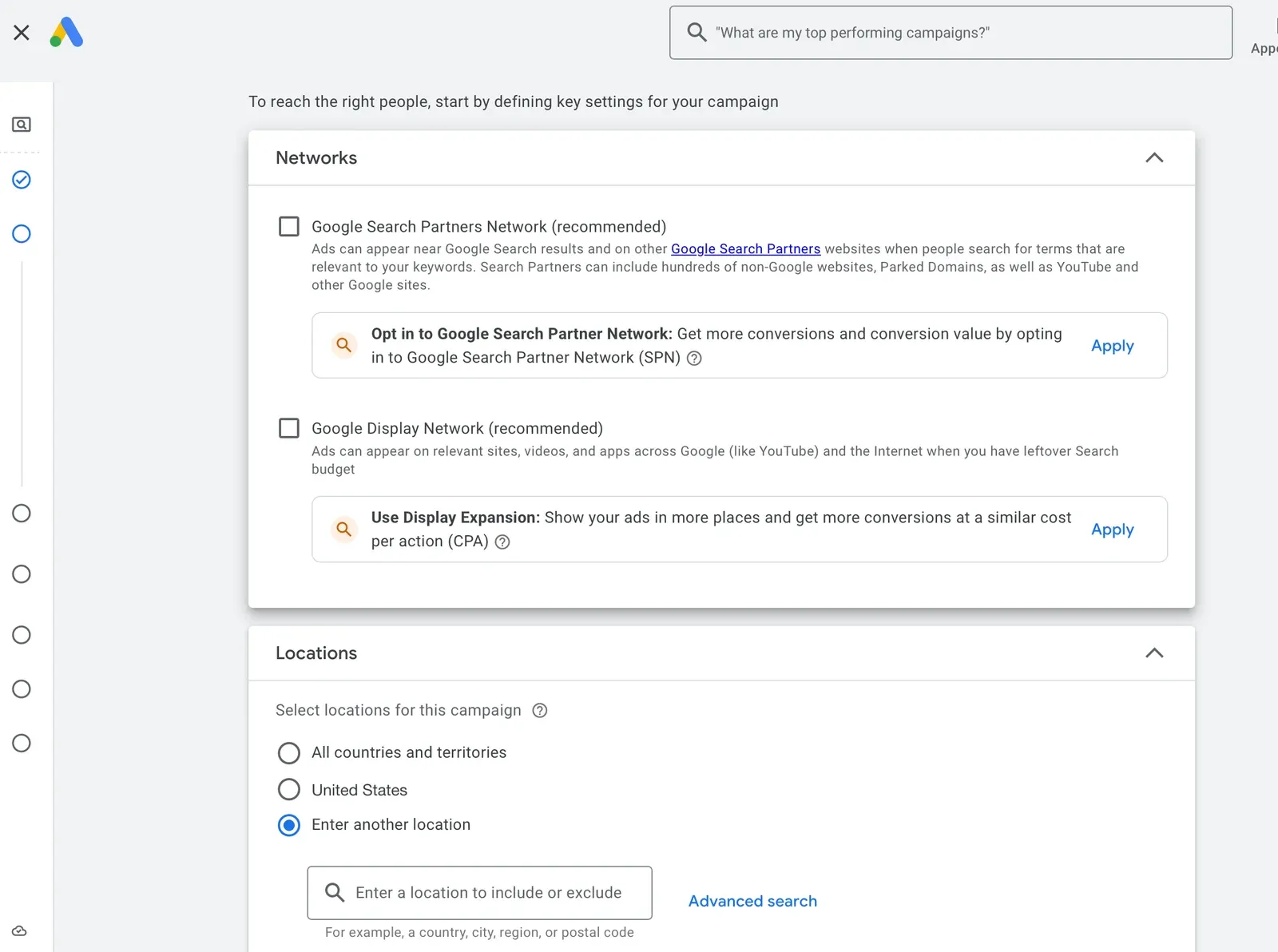
Network and location settings in a new Search campaign. Account details changed for privacy.
Look at the labels: both Google Search Partners Network and Google Display Network say (recommended). Search partners extend your ads to hundreds of non-Google websites and YouTube; the Display Network option — “Display Expansion” — shows your ads on sites and apps, in Google’s own words using “unspent Search budgets”.
My advice for a first campaign: untick both. In my experience a search-only campaign almost always converts better per impression. Someone who typed your keyword into Google is the reason you’re running a Search campaign; someone scrolling a website is a different audience with a different intent. You can test the partners later, separately, once you know your baseline.
Locations and language
Choose the countries, regions or cities where your customers are, and the languages they use. Then open Location options: Google’s default targets people “in, regularly in, or who’ve shown interest in” your locations. If you only serve people who are actually there — a local service, a delivery area — switch it to Presence, so you stop paying for clicks from people who are merely interested in the place.
Budget
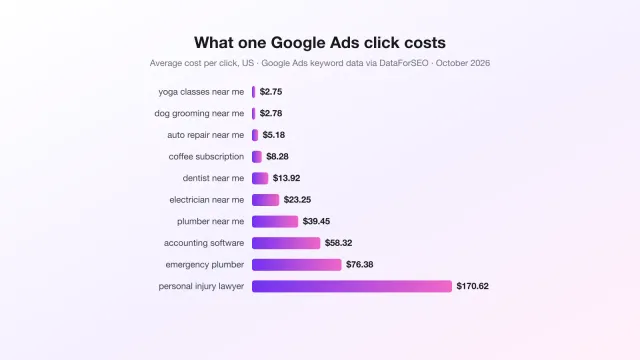
Set an average daily budget you can sustain. Two things to know: on any single day Google can spend up to twice your daily budget to catch traffic peaks, and over a month it won’t charge more than 30.4 times the daily amount. So $10 a day is a monthly ceiling of $304, with uneven days. How much to budget depends on what a click costs in your industry — I’ve put real numbers for 30 small-business keywords in how much Google Ads costs.
Bidding
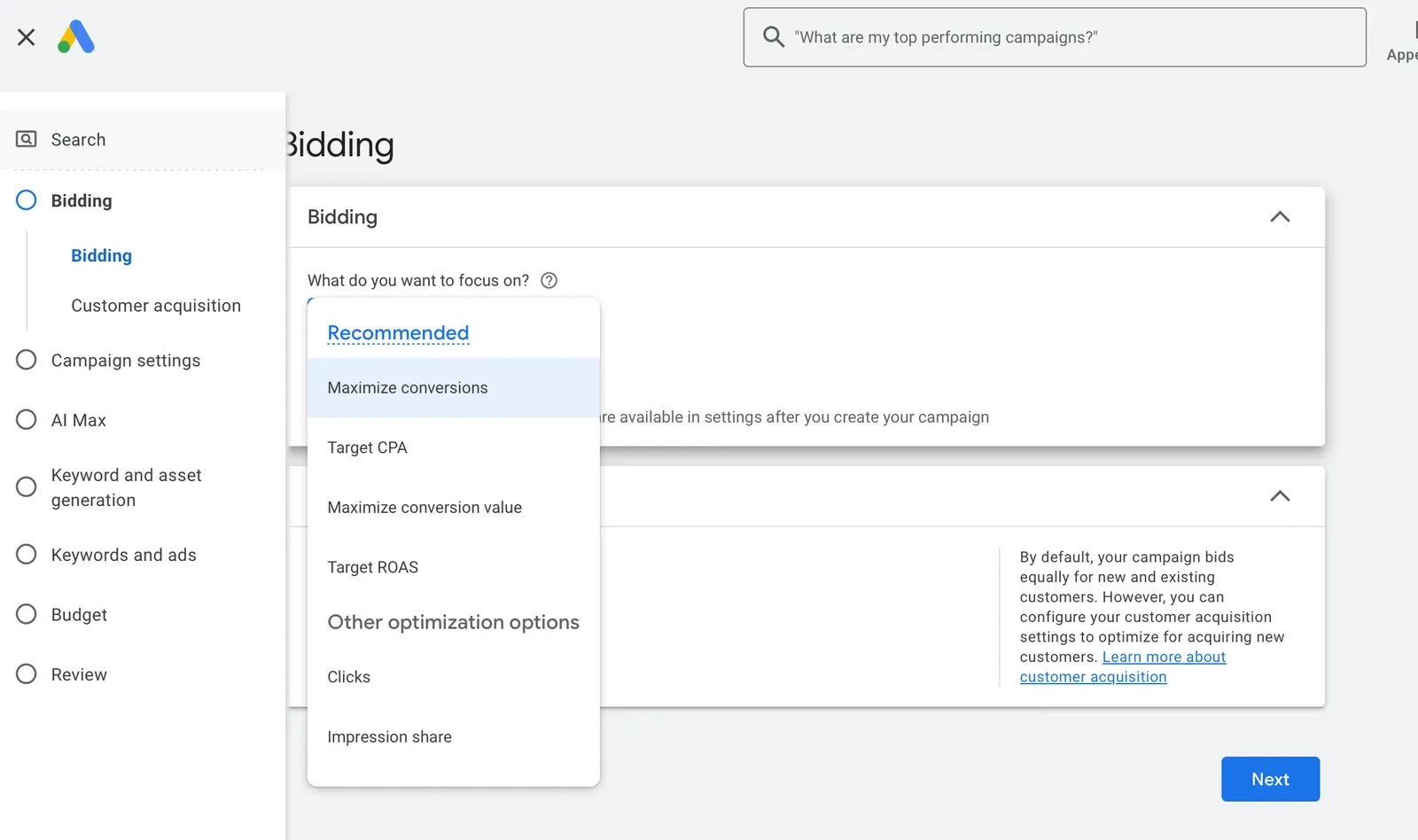
The bidding options in a new Search campaign.
If conversion tracking works, Maximize conversions is a sensible start. Once the campaign has a few weeks of conversions, you can give it a target with Target CPA — the cost per conversion you’re willing to pay. If your conversions carry values, the value-based twins (Maximize conversion value, Target ROAS) do the same for revenue.
Avoid optimizing for clicks unless you’re deliberately buying traffic to learn. Clicks are cheap to get and say nothing about whether anyone became a customer.
AI Max for Search
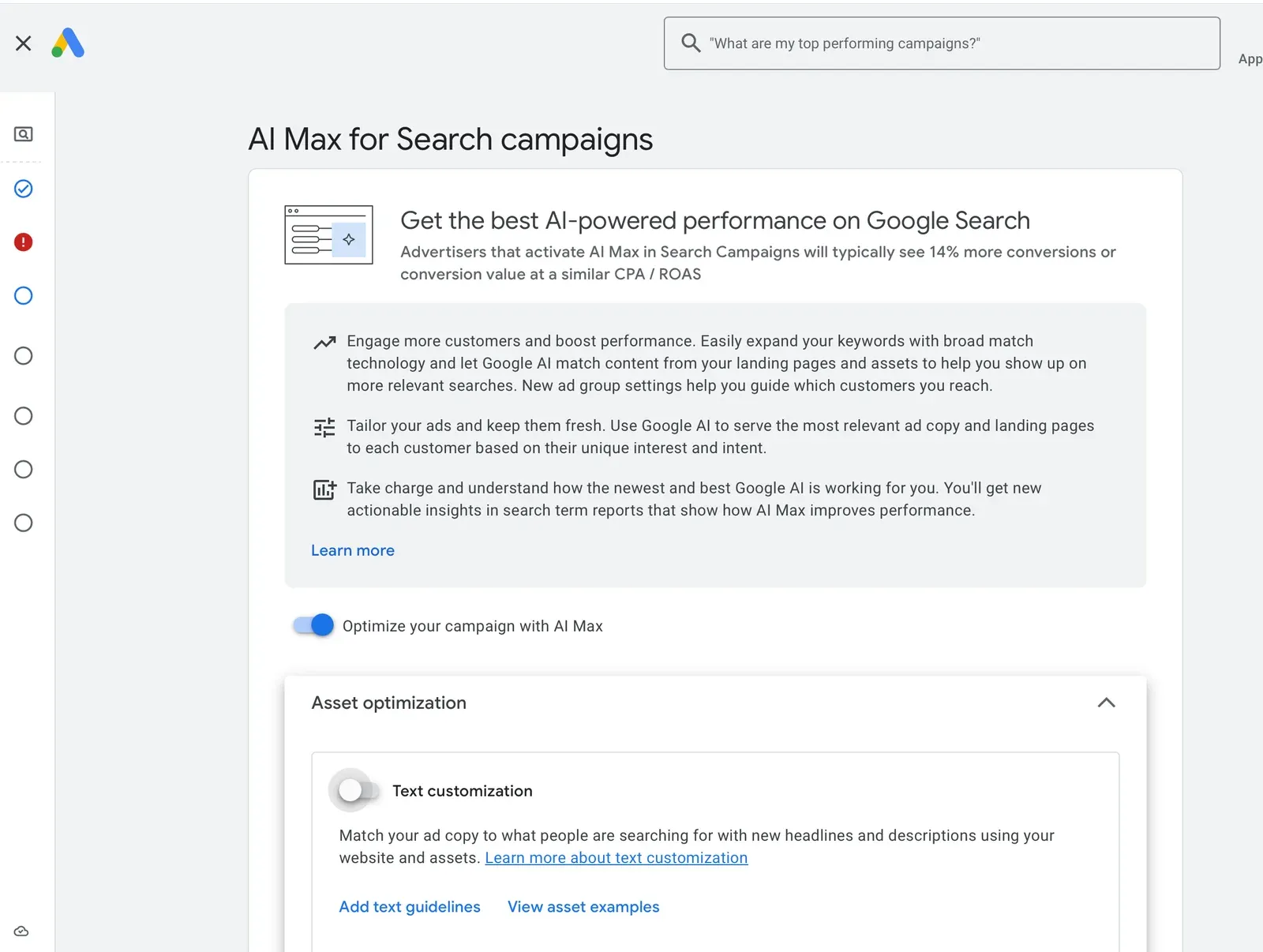
AI Max in the campaign setup, with Google’s own performance claim.
AI Max is Google’s newer layer of automation for Search campaigns. It has two parts: search term matching, which expands your keywords with broad match and “keywordless” matching to reach searches your keyword list doesn’t cover, and asset optimization, which can generate extra headlines and descriptions from your site (text customization) and send people to a more relevant page on your site than the one you set (final URL expansion).
Google says advertisers who turn it on “will typically see 14% more conversions or conversion value at a similar CPA / ROAS”. That’s Google’s figure, not an independent one. AI Max can genuinely find good searches you’d never have listed — but it also widens what you pay for. If you turn it on, use the controls Google gives you (brand inclusions, URL inclusions, locations of interest), and watch the search terms report closely in the first weeks.
Step 4: Split the campaign into several ad groups
An ad group is a set of keywords that share one theme, the ads written for them, and the page they land on. Don’t build one ad group with fifty keywords. Build several small ones, each around one thing people search for: one service, one product line, one problem.
Two reasons. First, relevance: a tight theme lets you write ads and pick a landing page that match every keyword in the group (steps 6 and 7). Second, Google’s bidding shifts spend toward what converts. With several ad groups, the themes that work get more of your budget and the weak ones get less — and you can see which is which in your reports.
A coffee shop, say, might have ad groups for coffee beans, coffee subscriptions and brewing equipment, rather than one ad group called coffee.
Step 5: Choose your keywords
This is where most budgets are won or lost. Look at four things for every keyword:
- Intent. “buy espresso beans online” is a buyer. “what is espresso” is a reader. Pay for buyers.
- Volume. How many people search it each month. Too low and nothing happens; too high and it’s usually too broad or too expensive.
- Competition and cost per click. How many advertisers bid on it, and what a click typically costs. High competition isn’t a no — it means the keyword makes money for someone — but your budget has to be able to afford the clicks.
- Relevance to your page. If your landing page can’t answer that search, don’t buy it.
Google’s Keyword Planner (under Tools) gives you volume and cost estimates. To see which searches your competitors win and you don’t, you can run our free competitor keyword analysis — it shows real search volume and bid ranges for the gaps.
Match types
Each keyword has a match type that decides how loosely Google matches it to searches:
| Match type | How you write it | What it matches |
|---|---|---|
| Broad | coffee beans | Searches related to your keyword, even without the same words. The default. |
| Phrase | "coffee beans" | Searches that include the meaning of your keyword. |
| Exact | [coffee beans] | Searches with the same meaning or intent as your keyword. |
Broad match reaches the most searches and needs the most supervision. If you’re starting with a small budget, phrase and exact give you control while you learn what converts. If you use broad match, or AI Max, the next part matters even more.
Negative keywords
Negative keywords stop your ads from showing for searches you don’t want: “free”, “jobs”, “DIY”, “how to make”, your competitors’ support pages. Start with an obvious list, then grow it every week from the search terms report (more on that below).
Step 6: Write ads that match the keywords
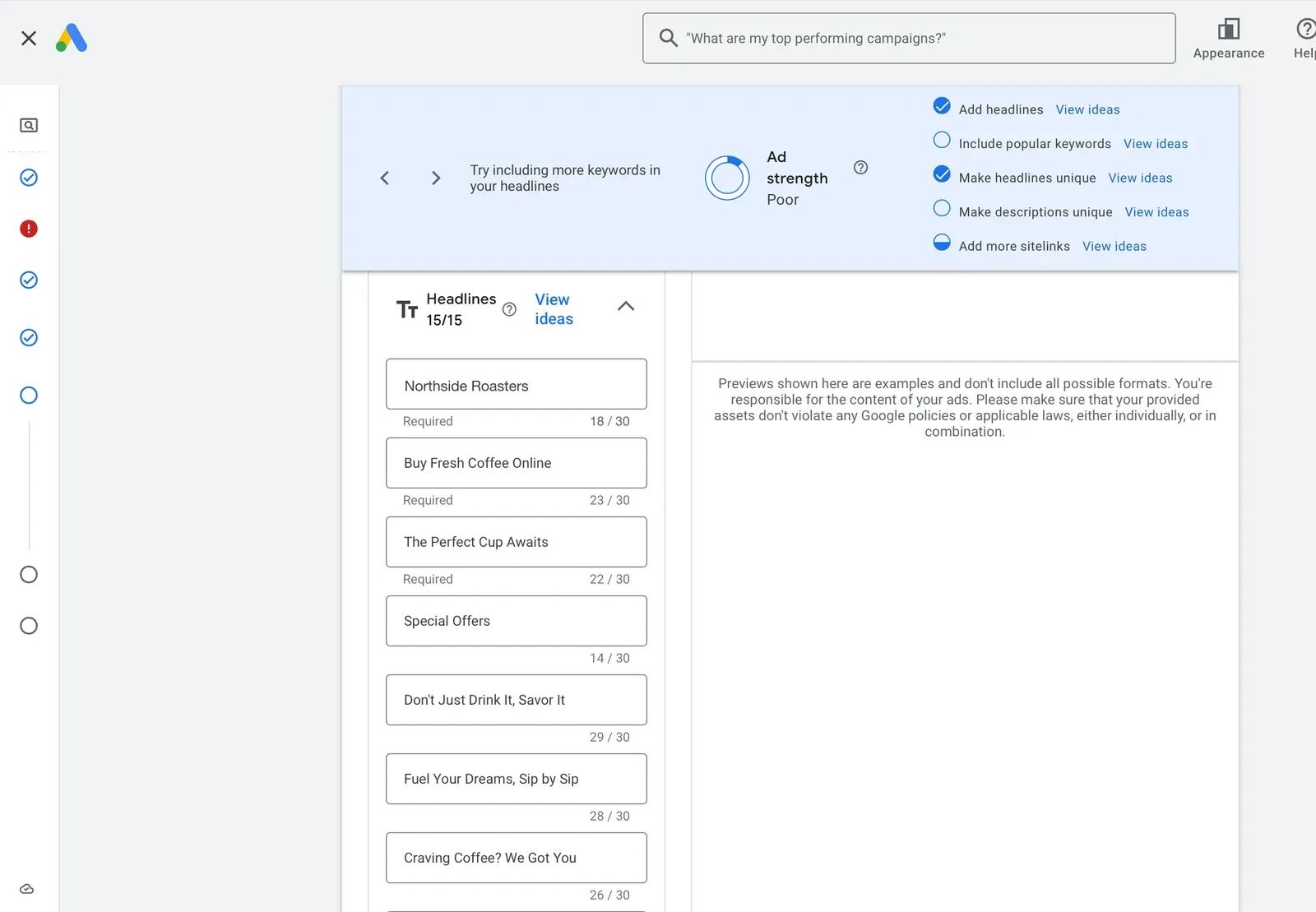
Writing a responsive search ad. Google’s Ad strength nudges you to use your keywords in the headlines. Account details changed for privacy.
Search ads today are responsive search ads: you give Google up to 15 headlines (30 characters each) and up to 4 descriptions (90 characters each), and it mixes them for each search. You need at least 3 headlines and 2 descriptions.
The rule that matters: put the keyword in the ad. When someone searches “coffee subscription” and sees a headline saying Coffee Subscription — Free Delivery, they know they’re in the right place. That’s ad relevance, and it’s one of the three parts of Google’s Quality Score, alongside expected click-through rate and landing page experience. Google is clear that Quality Score is a diagnostic tool, not a target in itself — but ads that are relevant to the search tend to be clicked more and win better positions for less.
A few habits that work:
- Give every ad group its own ad. A generic ad shared across themes is relevant to none of them.
- Mix headline types: the keyword, the benefit, the proof (reviews, years, guarantees you actually offer), the call to action.
- Add sitelinks and callouts. They make the ad bigger and give people more ways in.
Step 7: Make the landing page match the ad
Here’s where a lot of money quietly leaks away. Someone searches for a coffee subscription, clicks an ad that promises one, and lands on a homepage about your café’s history. They leave. You paid for the click anyway.
The page an ad group sends people to should continue the exact promise the ad made: the same words in the headline, the same offer, the next step obvious. This is landing page experience, the third part of Quality Score, and it’s also simply what turns clicks into customers.
The hard part is scale. Three ad groups means three promises; thirty means thirty, and building a separate landing page for each is days of work. That’s the problem website content personalization solves: the same page adapts its message to the ad that brought the visitor.
After launch: the first 30 days
Launching is the start, not the finish. Ads are usually reviewed within one working day, and then the bidding strategy needs a learning period — a few conversion cycles, according to Google — before results settle. Don’t change everything on day two. But don’t leave it alone for a month either.
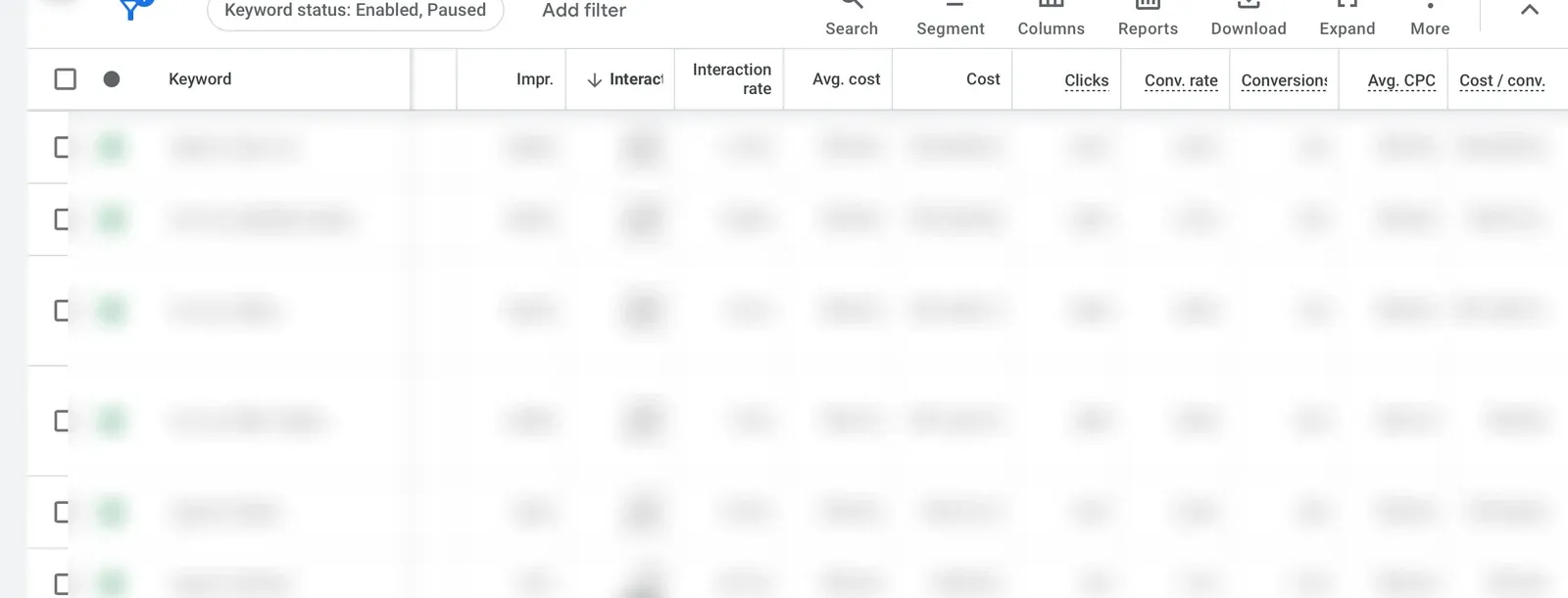
The keywords report, with keywords and figures blurred for privacy. The columns are the point.
The metrics that matter
- Conversions and cost per conversion. The two numbers that tell you if this is working. Everything else explains them.
- Conversion rate. Low conversion rate with good click-through rate usually means the landing page isn’t keeping the ad’s promise.
- Click-through rate (CTR). Low CTR usually means the ad doesn’t match the search.
- Average cost per click. Watch it against your cost per conversion, not on its own.
- Search impression share. How often you showed when you could have. “Lost to budget” and “lost to rank” tell you which lever to pull.
- Quality Score and its three parts. As a diagnostic: it points at the weak link — the ad, the page, or the click-through rate.
A weekly routine
- Read the search terms report. These are the actual searches your ads showed for. Add the irrelevant ones as negatives. Add the good ones you weren’t targeting as keywords.
- Check spend without conversions. A keyword that has had plenty of clicks and no conversions is a candidate to pause.
- Refresh weak ads. Replace the headlines Google reports as low-performing.
- Once a month, move budget toward the ad groups with the best cost per conversion.
Why you shouldn’t accept every Google recommendation
Google Ads has a Recommendations page and an optimization score, and both will nudge you all the time: raise your budget, switch to broad match, turn on Search Partners, add Display Expansion, turn on more automation.
Some of these are genuinely useful. But be clear about whose interest they serve. Google wants you to succeed — a successful advertiser keeps advertising. Google also earns more when you spend more. That’s a conflict of interest, and the recommendations sit right in the middle of it. Notice that the two network boxes in step 3 were both pre-labelled “recommended”, and that AI Max opens with Google’s own performance claim.
Google itself says the optimization score is not factored into Quality Score or Ad Rank. Applying a recommendation to raise that score doesn’t improve your position in the auction. So judge every recommendation by one question: will this lower my cost per conversion, or just raise my spend? Apply the first kind. Test or skip the second.
How to do all of this in minutes with Convertus
Everything above is what a good setup takes, and it’s a lot: research, structure, copy, pages, then a weekly routine you can’t skip. That’s the work Convertus does for you.
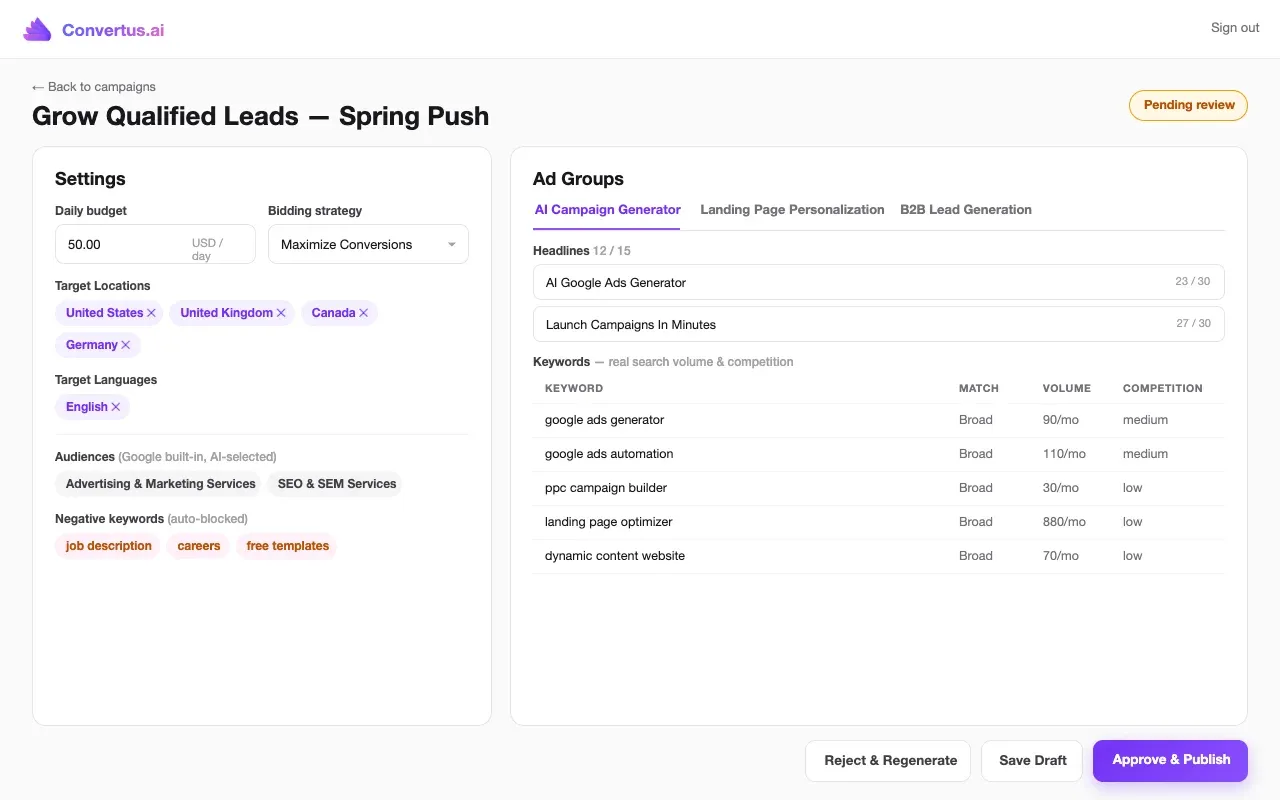
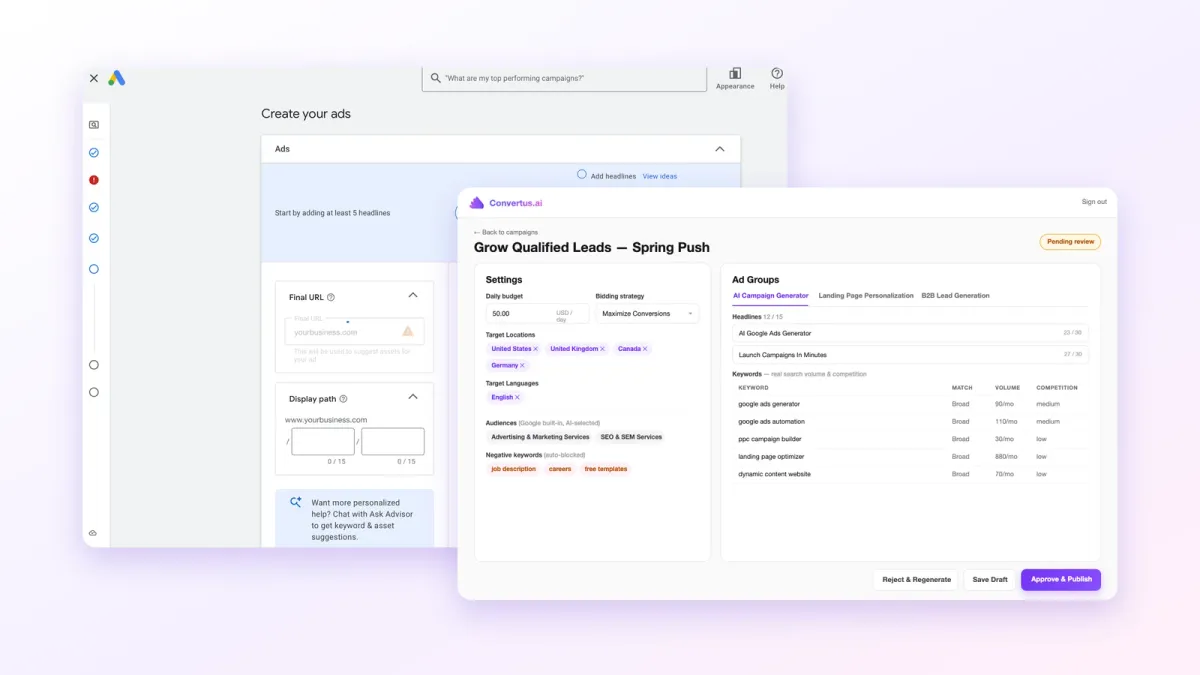
A campaign draft in Convertus (sample campaign): settings, audiences, negatives, and ad groups with keywords chosen on real search volume and competition.
You describe your goal in one prompt, and the AI builds the full Search campaign:
- multiple ad groups, each with its own Google built-in audiences and keywords chosen on real search volume and competition;
- ad copy matched to your keywords and your page, and negative keywords added from the start;
- AI Max on by default — with the weekly negatives below keeping it on track;
- a personalized landing page for every ad group, so the page keeps each ad’s promise without you building new pages.
Nothing goes live until you approve the draft. Then AI agents review the campaign every week:
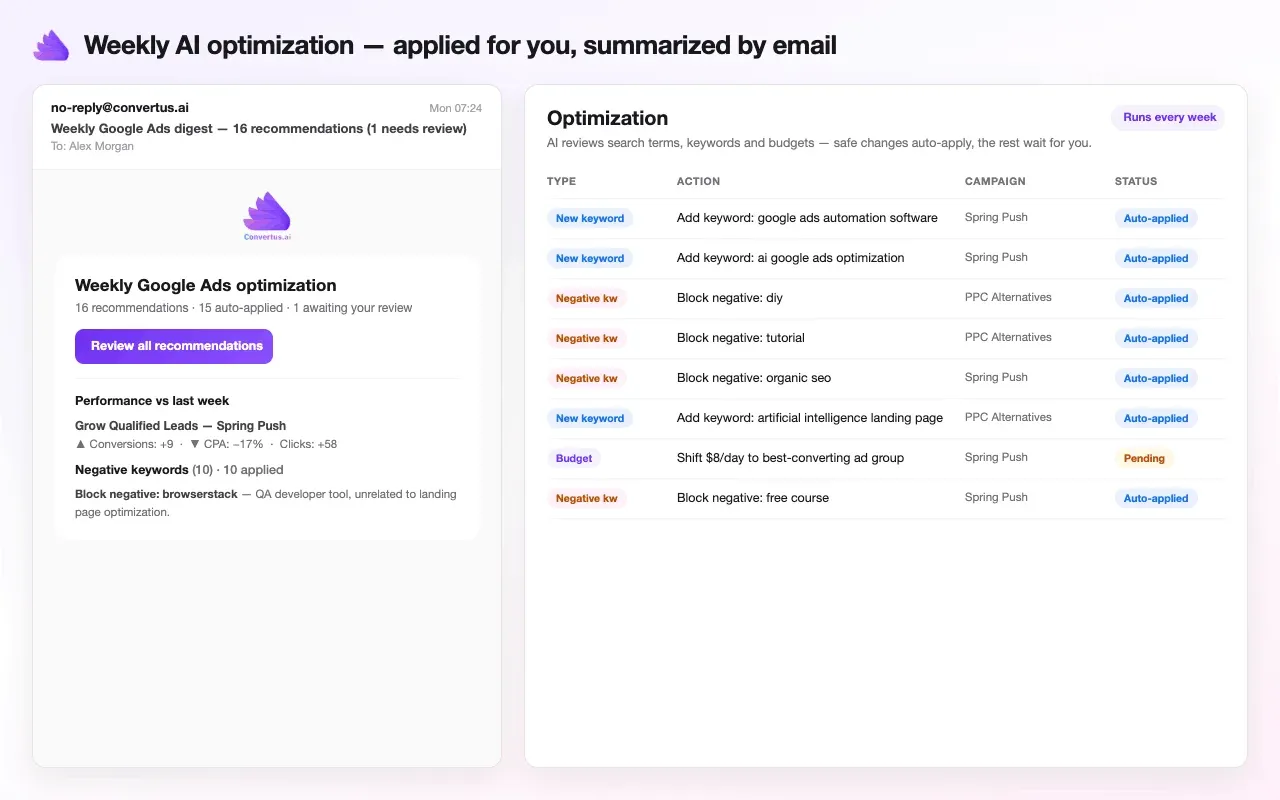
Weekly optimization in Convertus (sample campaign): safe changes auto-apply, budget changes wait for your approval.
Each week they analyze campaign, ad-group, search-term and audience performance, then apply safe wins like new keywords, negatives, match-type improvements and refreshed ad copy. Budget and bidding changes always wait for your approval. And unlike the Recommendations page, Convertus has one goal: your cost per conversion, not your spend.
You can start a 14-day free trial — no credit card — and have your first campaign drafted in minutes.
Frequently asked questions
How do I set up my Google Ads account?
Go to ads.google.com and sign in with a Google account. During sign-up Google steers you into a Smart campaign; switch to Expert mode instead, add your billing details, then create a Search campaign with the settings in this guide.
Is $10 a day enough for Google Ads?
Divide the budget by the average cost per click of your keywords. At $10 a day and a $2 click you buy about five clicks a day, roughly 150 a month. Whether that is enough depends on your conversion rate, so check the cost-per-click estimates in Keyword Planner for your own keywords before you decide.
How long does it take for Google Ads to start?
Most ads are reviewed within one working day, according to Google. After that, a Smart Bidding strategy needs a learning period of a few conversion cycles before its results settle, so judge the campaign after that, not on day two.
Which campaign is best for Google Ads?
For people who are actively searching for what you sell, a Search campaign. Performance Max, Demand Gen and Display campaigns serve other goals, like reach across Google's channels. If you are setting up your first campaign, start with Search.