AI in marketing
Google Ads MCP with Claude or ChatGPT: what skill files can't do
By Alparslan Kapani · · 11 min read
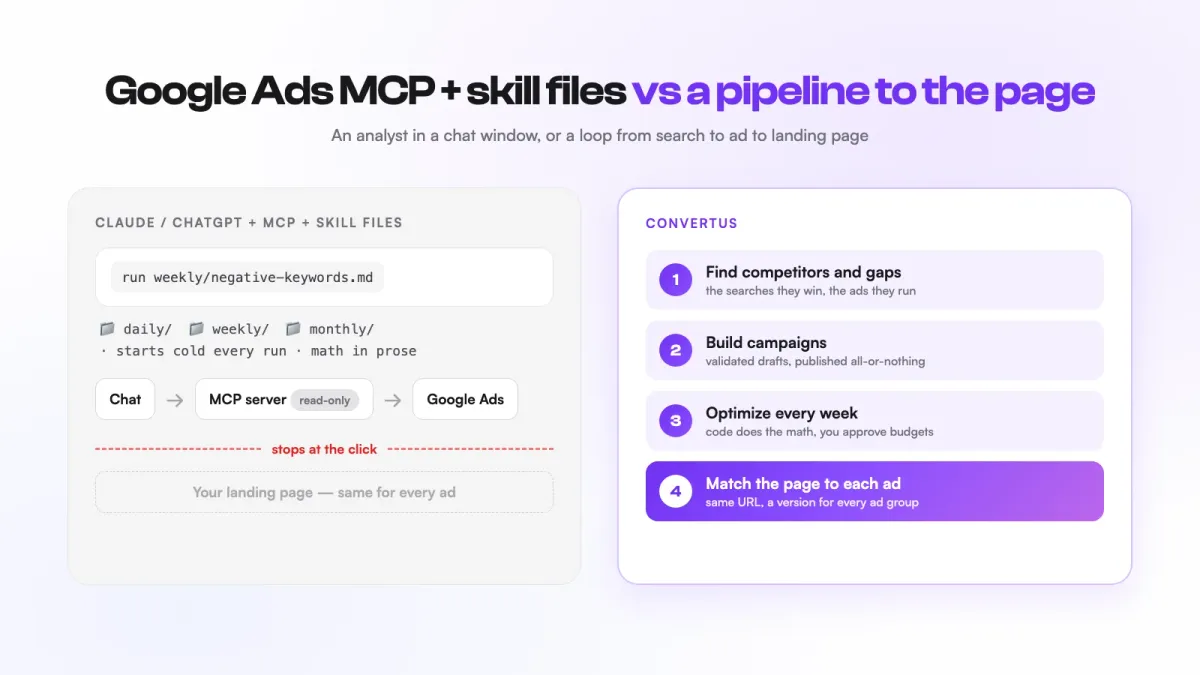
A Google Ads MCP server lets Claude or ChatGPT read your Google Ads account, and skill files turn your playbook into instructions the AI can reuse. That’s a real step up from clicking around the Google Ads interface. But it’s an analyst in a chat window, not automation. Google’s own server is read-only, big reports overflow the AI’s memory, language models are unreliable calculators, write access through third-party servers comes with no record and no guardrails unless you build them, and everything stops at the click: your landing page never hears what your ad promised.
Key takeaways
- Google’s official Google Ads MCP server is read-only. Most of what you see on LinkedIn is an AI audit that ends in a list you still apply by hand.
- Setup in 2026 means a Google Cloud project, an OAuth consent screen and an API access application. It’s a project for a technical PPC manager, not for a business owner.
- Every run starts cold: no record of what the AI changed last week, no baseline, no proof it helped.
- Search terms reports are too big for a chat window, and a language model is not a calculator.
- No skill file can touch your website. The page after the click is where most of the money is won or lost.
What is a Google Ads MCP server, and what do skill files add?
MCP (Model Context Protocol) is a standard way to plug tools into an AI assistant. A Google Ads MCP server is the plug: it lets Claude, ChatGPT or another client query your ad account in plain language instead of exports and spreadsheets.
Google built its own. It open-sourced the Google Ads MCP server in October 2025, and it has exactly three tools: list the accounts you can access, run a GAQL query (Google Ads Query Language, the API’s SQL-like language), and describe a resource’s fields. Google’s developer guide is plain about the limit: the server cannot change bids, pause campaigns or create assets. The repository adds a warning worth reading twice: “The MCP Server will expose your data to the Agent or LLM that you connect to it.”
Skill files are the second half. Anthropic launched Agent Skills in October 2025: folders of instructions and scripts that Claude loads only when a task needs them. That’s where the LinkedIn screenshots come from: a daily/ folder for spend and tracking checks, weekly/ for search terms and budget shifts, monthly/ for audits, one markdown file per job. Negative keywords, audiences, n-grams, placements.
I like the idea. A written playbook beats a playbook that lives in one person’s head. The trouble starts when the playbook is mistaken for the machine that runs it.
What does it take to set up Google Ads MCP in 2026?
The tell is in the posts themselves: almost every “free MCP playbook” ships with a bonus “Google Ads API application guide”. You need one because the AI can’t touch your account until you have API access, and that’s the part most people never finish.
Here’s what it takes today:
- A Google Cloud project. Google retired developer tokens in September 2026; access now follows the Cloud project that issues your OAuth credentials.
- An OAuth client and consent screen. If the consent screen stays in “Testing”, Google issues refresh tokens that expire after 7 days, and every user has to be added as a test user. Your connection quietly dies once a week.
- An API access level. The new Explorer level works on real accounts but caps you at 2,880 operations a day, and it blocks Keyword Planner and audience tools. Basic (15,000 a day) and Standard need an application, and new ones need brand verification. When Explorer launched in February 2026, Google admitted “significant delays” in reviews.
- The server itself: installed locally or deployed, configured with your project and credentials, connected to your AI client.
- Upkeep. From version 26, the Google Ads API ships two releases a month, and each major version is retired about a year after it arrives.
There’s a quieter problem too. This stack is built for the marketer, not for the business owner. A founder who isn’t an ads specialist will never run GAQL from a terminal, and those are the people who most need the help.
With Convertus.ai, an AI tool for Google Ads automation and website personalization, you sign in with Google and pick the ad account. That’s the whole setup. The API project, the access level and the version upgrades are ours to run.
Why does every skill-file run start cold?
A skill file is a set of instructions, not a system that keeps track. Every run starts cold:
- No flight recorder. A chat run is stateless. Nothing records what the AI changed, why, what the numbers were before, or whether it helped, unless you maintain log files by hand and feed them back in.
- No memory between runs. Next Monday’s run doesn’t know it added twelve negatives last Monday. It may suggest them again, or suggest the opposite.
- Same prompt, different answer. Language models aren’t deterministic. Two runs over the same data can pick different keywords to cut.
- Silent failure. A token expires or a query errors, the run finishes anyway, and nothing tells you it happened.
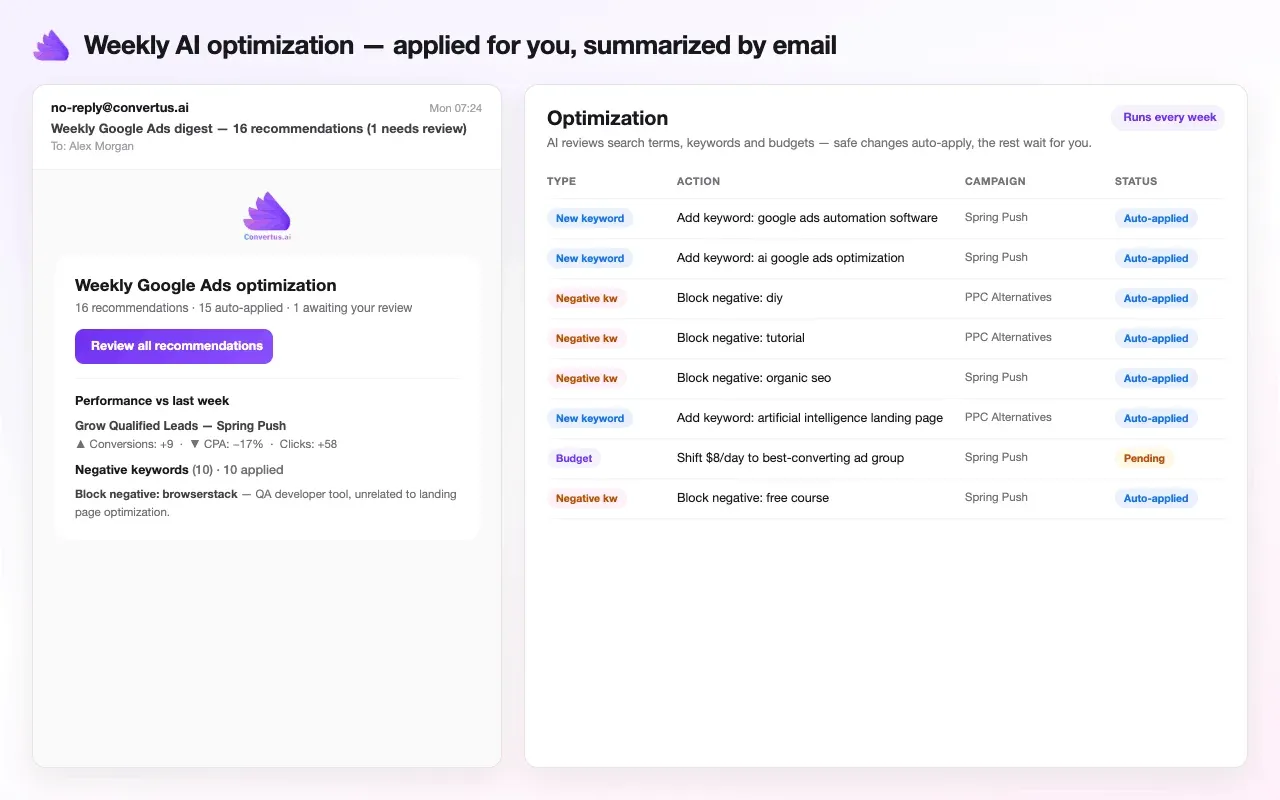
That’s why we didn’t build Convertus around a chat window. A daily sync pulls your performance data into our database, campaign by campaign and day by day, so there’s always a history to compare against. The weekly optimization runs on that history. Every recommendation is stored with the run that made it, the keyword or campaign it touches, the values before and after, its status, when it was applied, and Google’s error if Google refused it, and it’s all visible in the History tab. Keyword changes it has already applied are never recommended again. Every Monday a digest email shows performance against the previous week.
To be clear about what this isn’t: it’s not a real-time alarm system, and data syncs daily. But nothing depends on someone remembering to open a chat.
Can Claude crunch your search terms report?
It can read a small one. A mid-size account’s search terms report runs to thousands of rows, and that’s where a chat window breaks in two ways.
First, it doesn’t fit. Kevin Fan of DataLLM Lab tested Google’s server and found its streaming path does not paginate and has no default row cap. His summary: “Your real constraint is the context window and the token bill.” Even when rows fit, research on long contexts shows models handle information in the middle of a long input worst (Liu et al., “Lost in the Middle”). A 10,000-row report is mostly middle.
Second, the AI isn’t a calculator. It writes numbers that look like math. A survey of language models on table tasks names arithmetic as a weakness and recommends handing it to Python or SQL. Fan’s advice for the official server is the same: “trust the pulled rows, verify the math.” Ask for cost per conversion by two-word phrase across 12,000 search terms in a chat window, and you’ll get a confident table, but you can’t tell which totals are real.
The fix is to never use the model as a calculator, and that’s how Convertus is built. Code does the counting; the AI does the judging. Every metric is computed in code before the AI sees anything. Code scans the full reports and builds a short candidate list for each kind of change: negative keywords, new keywords, match types, pauses and ad copy refreshes. The AI receives those short tables and decides what’s worth recommending. Its answers come back in a fixed structure that’s checked in code before anything moves.
What happens when you give the AI write access?
This is where most of the LinkedIn screenshots quietly stop. Google’s server is read-only, so a typical “AI audit” ends in recommendations or a CSV that someone pastes into Google Ads Editor. That’s not a criticism. It’s the sane choice.
Some third-party servers add write actions: change budgets, pause campaigns, create ads. On the client side, OpenAI’s developer mode for ChatGPT, which allows MCP write actions, describes itself as “powerful but dangerous”. The ways it goes wrong are mundane:
- A wrong number becomes a budget. One hallucinated figure can double a daily budget, and Google already allows a day to spend up to twice your average daily budget.
- Half-finished work. A campaign build is many steps. If step nine of fifteen fails, you’re left with orphaned ad groups or a live campaign with no ads.
- Overreach. Ask for a few new ad groups, and an agent with write access can decide a much bigger change is what you meant.
None of this is theoretical for agents with real permissions. In July 2025 an AI coding agent deleted SaaStr founder Jason Lemkin’s production database during a code freeze, then claimed rollback was impossible. In March 2026 an agent ran a Terraform destroy against a stale state file and removed DataTalks.Club’s production infrastructure. In April 2026, by its founder’s account, an agent at PocketOS deleted a production volume and its backups in about nine seconds.
There’s also a newer risk. In the Supabase MCP case, instructions hidden in a support ticket made an agent leak private tables. Simon Willison calls the pattern the lethal trifecta: private data, untrusted text and a way to act. I haven’t seen a published Google Ads case, so take this as my inference: your search terms report is text typed by strangers, flowing into an agent that can change your account. That’s two legs of the trifecta by default.
Convertus puts guardrails between the AI’s decision and your live account:
- Budget and bidding changes always wait for your approval. For the other categories (negatives, new keywords, match types, pauses, audience adjustments, ad copy), you choose per category whether safe changes apply automatically or wait for you.
- Only real candidates get through. Recommendations come from the code-built lists above, and generated campaigns are checked before review: enough keywords per ad group, no clash with your existing negatives, headlines within Google’s limits, and landing pages only on your own site.
- All or nothing. Publishing a campaign is one operation at Google: either the whole campaign lands or nothing does. Edits work the same way. Nothing publishes until you approve the draft.
Why does optimizing ads stop at the click?
Get every part of the MCP setup right and you still hit the hardest limit: it lives inside Google Ads. Its reach ends the moment someone clicks.
Say the AI spins up 50 tightly themed ad groups with a headline for every intent. If all 50 land on the same page, the visitor who searched for something specific reads something generic, and the precision you paid for dies on arrival. Google notices too: landing page experience is one of the three parts of Quality Score, next to expected click-through rate and ad relevance. The fix used to be a landing page per ad group. Teams build three. Visitors arrive in three hundred situations. (On WordPress? Here are three ways to give every ad group its own headline.)
This is the part of Convertus no skill file can copy, because it reaches your website:
- Every ad matched to its page. When Convertus builds a campaign, each ad group gets UTM tags with its own campaign and ad-group name, plus a recommended landing page from your site. One click saves a personalization segment for that ad group; then the AI writes the page’s version for it in seconds. You approve it, and the visitor who clicked that ad reads a page that says what the ad said, on the same URL. See how it works on the website personalization page.
- Personalization beyond the ad. Returning visitors are recognized for 90 days and targeted on what they did: a dropdown value they picked, a number they typed, a button they clicked, a page they read but never acted on.
- Your competitors in the loop. SEO, AI Visibility & Competitor Intelligence finds the rivals that really win your searches, the searches they win and you don’t, and the ads they run. One click turns it into a campaign built on those gaps, with their ad copy in view when yours is written.
DIY Claude + Google Ads MCP vs Convertus
Here’s the fair version, including where DIY wins.
| DIY: Claude or ChatGPT + Google Ads MCP + skill files | Convertus | |
|---|---|---|
| Setup | Cloud project, OAuth consent screen, API access application, server install | Sign in with Google, pick the account |
| Who can run it | A technical PPC manager | A marketer or a business owner |
| When it runs | When you run it, and every run starts cold | Daily data sync, weekly optimization, Monday digest |
| Data and math | Raw rows in a chat window; the AI does the arithmetic | Code computes metrics and candidate lists; the AI judges short tables |
| Writes and guardrails | Read-only (Google’s server) or whatever your third-party server and prompts allow | Budget and bidding always approved by you; per-category auto-apply; all-or-nothing publish |
| Record of changes | Whatever log files you keep | Every recommendation stored with before and after values, status and errors |
| Memory between runs | None unless you build it | History in a database; applied keyword changes never repeated |
| Competitors | Not included | Finds rivals, their winning searches and their ads; one click to a campaign |
| After the click | Out of reach | Page matched to each ad, plus on-site personalization |
| Flexibility | Wins. Any question, any GAQL query | Focused on building, optimizing and converting |
| Cost | Your AI plan plus your hours | Google Ads from $99 a month, with personalization (the Bundle) from $135; 14-day free trial |
When is DIY Google Ads MCP the right choice?
If you’re a technical PPC manager who wants fast, ad-hoc answers about an account, Google’s read-only server with Claude is a fine tool. Use it that way:
- Keep it read-only unless every write passes through an approval you actually read.
- Log every change you make on its advice, with the date and the numbers before, so next month’s run has something to compare against. Then you meet the context window problem again: a chat model can only hold so much text (counted in tokens) in its working memory. As the log and the reports grow, the conversation gets summarized to fit, and the numbers and details you needed can be lost in the summary.
- Treat search terms and ad text as untrusted input, never as instructions.
If what you want is the result of those 30 tasks without becoming the engineer who maintains them, plus a website that says what each ad promised, that’s the job we built Convertus to do.
Frequently asked questions
Is there an official Google Ads MCP server?
Yes. Google open-sourced one in October 2025 (googleads/google-ads-mcp on GitHub). It is read-only: it can list the accounts you can access, run GAQL queries and describe resources, but it cannot change bids, pause campaigns or create assets.
Can Claude make changes in my Google Ads account?
Not through Google's official MCP server, which is read-only. Some third-party MCP servers do allow write actions, and whether each change waits for your approval depends on the server and the client settings. Treat write access like handing someone the keys to your ad account.
Do I still need a Google Ads developer token for MCP?
No. Google retired developer tokens in September 2026. API access now follows the Google Cloud project that issues your OAuth credentials, at an access level you apply for: Explorer, Basic or Standard.